
Bone Maestro
A personal Halloween experiment in iOS interaction design, Bluetooth integration, and programmable animatronic performances.
- iOS
- SwiftUI
- Hardware + Bluetooth
- Prototyping
- Interaction Design
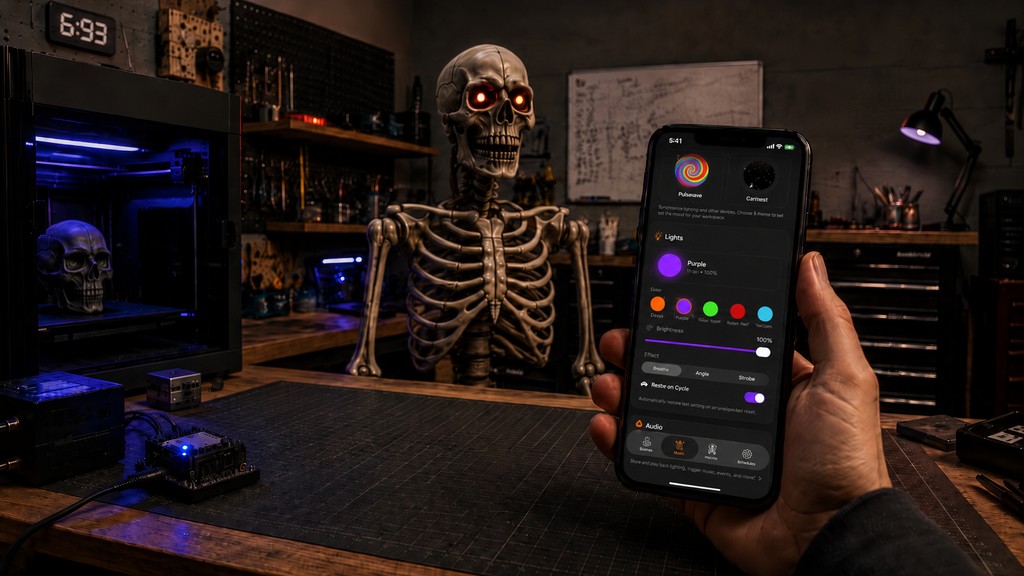
A side project exploring how far a consumer Halloween animatronic can go when you redesign the control layer — native iPhone interactions, Bluetooth integration, and custom scenes.
Why I wanted to build this?
Me and my family are obsessed with Halloween, and I love product experimentation. The Home Depot Ultra Skelly is fun out of the box — but the stock app stops short of what the hardware feels capable of.
I wanted to push that animatronic past default modes into something more expressive and programmable: clearer controls, custom performances, and room to experiment with voice and character.
What I explored
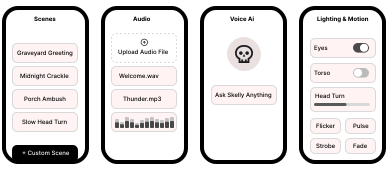
- Designing clearer mobile controls for motion, audio, lighting, and related states.
- Learning the skeleton’s Bluetooth behavior with a sniffer and a community web controller — treating every command as a candidate until verified.
- Testing custom scenes for programmable performances.
- Exploring voice, text-to-speech, and conversational concepts (roadmap, not shipped).
- Documenting technical research and protocol notes along the way.
What I built
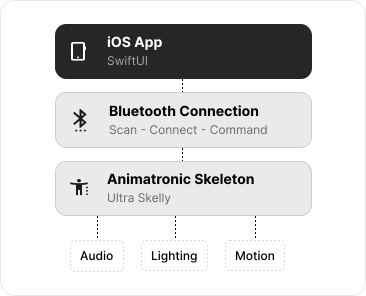
Bone Maestro is a SwiftUI-based iOS app for controlling the Home Depot Ultra Skelly. The focus is a clearer control surface for Bluetooth connection, animatronic status, and the core performance channels: audio, lighting, and motion.
The app supports custom scenes, volume control, mouth sync, and light controls — treating the skeleton less like a one-shot gag and more like a programmable performer.
What I learned
- 01Design for the real world.
- 02Test, learn, document.
- 03Prototype across the whole system.
- Hardware UX needs more clarity than software-only products — connection state, latency, and physical feedback have to stay visible.
- Experimentation works better when knowns are separated from assumptions, then tested and documented.
- Building in SwiftUI connected interaction decisions to connection state, hardware behavior, and what I could test on the prop.